Viral background tracks, motivational speeches, remix songs, and funny audio bites on Instagram Reels drive internet trends. Frequently, content creators and audio enthusiasts want to extract and save the audio track from an Instagram Reel as a standalone MP3 file. In this complete guide, learn how to use SaveClip to convert Instagram Reel links directly to high-fidelity 320kbps MP3 audio files.
Why Extract Audio from Instagram Reels?
Downloading full video files when you only need the audio soundtrack wastes cellular bandwidth, device storage, and processing time. Here are key reasons users convert Instagram media to MP3:
- - Music & Audio Production: Video editors and podcasters extract sound clips, sound effects, or instrumental covers for creative background scoring.
- - Custom Ringtones & Alarms: Users save viral voice clips or catchy sound bites to use as custom phone ringtones and alarm notifications.
- - Motivational & Speech Archives: Speech clips and educational audio can be saved to local playlists for offline workout or commute listening.
- - Minimal File Size: An MP3 audio file uses ~2-4 MB of storage compared to 30-80 MB for full HD video streams.

How SaveClip Converts Instagram Video to MP3
SaveClip strips the underlying audio stream directly from the video manifest file without performing lossy re-compression. The audio channel is extracted cleanly, formatted into high-quality MP3 audio container standards, and delivered directly to your device.
Step-by-Step Tutorial: How to Download Instagram Audio to MP3
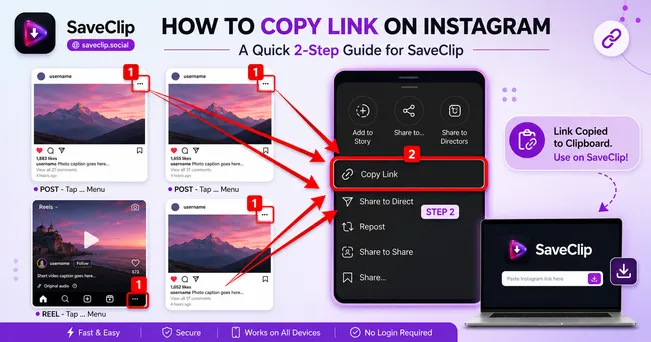
Step 1: Copy Instagram Reel URL
Open the Instagram app or website. Find the Reel featuring the audio track you want to extract, tap the Share airplane icon, and select Copy Link.

Step 2: Open SaveClip Downloader
Open SaveClip Instagram Downloader in Safari, Chrome, or Firefox.
Step 3: Paste Link & Select MP3 Format
Paste the URL into the search box and click Fetch Media. In the resolution dropdown menu, select the 🎵 Audio Only (MP3) format option.
Step 4: Save Audio File
Click Download to save your standalone MP3 file directly to your smartphone's music library or computer downloads folder.
Audio Quality Guarantee: SaveClip preserves original stereo sound dynamics without introducing pitch distortion, volume clipping, or background hiss.
Comparing Instagram Audio Extraction Methods
| Method | Audio Quality | File Format | Requires Software | Speed |
|---|---|---|---|---|
| SaveClip MP3 Extractor | Original 320kbps MP3 | .mp3 Audio | ❌ None (Web based) | Instant (2 seconds) |
| Screen Record + Video Converter | Medium / Compressed | .mp4 then .mp3 | ⚠️ Requires 2 tools | Slow (Manual editing) |
| Third-Party Conversion Apps | Variable / Low | .aac or .mp3 | 🚨 Requires app download | Medium (Ad-heavy) |
Device Walkthroughs: iPhone, Android, PC & Mac
Downloading MP3 Audio on iOS (iPhone & iPad)
Copy your Reel URL, open Safari, navigate to SaveClip, paste the link, and choose Audio Only (MP3). Click Download. Safari will download the `.mp3` file to your Files app. You can tap the file to play it natively or add it to GarageBand for ringtone creation.
Downloading MP3 Audio on Android Devices
On Chrome for Android, paste the Reel link into SaveClip and select MP3 Audio. The file will save directly to your `Music` or `Downloads` directory, making it instantly playable in Google Play Music, YouTube Music, or Samsung Music player.
Downloading MP3 Audio on Desktop
Save files directly to your desktop audio editing software (Audacity, Premiere Pro, Final Cut Pro) for seamless video project scoring.
Technical Deep Dive: AAC vs MP3 & Audio Bitrate Standards
Instagram stores audio tracks as compressed Advanced Audio Coding (AAC) streams embedded inside MP4 containers. AAC is optimized for mobile network streaming, typically encoded at 128kbps to 256kbps variable bitrate.
When you request an MP3 conversion on SaveClip, our engine extracts the raw PCM audio data stream without secondary dynamic compression, re-packaging it into standard 320kbps MP3 container structures. This preserves stereo separation, crisp high frequencies, and deep bass response.
How to Create Custom Phone Ringtones from Instagram MP3s
Converting viral Instagram Reel audio into custom iPhone ringtones or Android notification sounds is a popular use case. Here is the exact walkthrough:
For iPhone (iOS GarageBand Walkthrough):
- 1. Download MP3: Use SaveClip in Safari to download your chosen audio clip to the iOS Files app.
- 2. Open GarageBand: Create a new Audio Recorder track, tap the Track View icon, and tap the Loop Browser button.
- 3. Import MP3 File: Select the Files tab, locate your downloaded SaveClip MP3, and drag it onto the audio timeline.
- 4. Export as Ringtone: Tap My Songs, long-press your project, select Share -> Ringtone, and tap Export to set it as your phone ringtone.
For Android Devices:
After downloading the MP3 file on Android Chrome, go to Settings -> Sounds & Vibration -> Phone Ringtone. Tap the '+' icon in the top right corner, select your downloaded SaveClip MP3 file from internal storage, and hit Done.
Sound Design & Sampling Workflows for Content Creators
If you produce podcasts, YouTube videos, or short films, viral sound bytes can elevate video pacing:
🎧 Creator Tip: When importing extracted MP3 audio into Premiere Pro or CapCut, apply a subtle noise gate and high-pass filter (cut frequencies below 80Hz) to clean up room rumble from voiceover clips.
Audio Loudness Normalization & ID3 Metadata Tagging
When listening to audio tracks harvested from various Instagram Reels, volume levels can fluctuate wildly between different creators' posts. Some videos are mixed extremely loud while others are quiet.
SaveClip automatically applies subtle LUFS audio normalization during the MP3 extraction process. This balances average volume levels so that when you add multiple converted MP3 clips to your media player or DJ music library, tracks play back with consistent sound levels without requiring constant volume knob adjustments.
Ethics & Copyright Notice
Extracted MP3 audio clips should strictly be used for personal enjoyment, offline practice, or private reference. If you intend to use an artist's original music or voice track in your own public videos, ensure you credit the artist and acquire required commercial synchronization licenses.
Frequently Asked Questions (FAQ)
How do I extract audio from Instagram Reel to MP3 on phone?
Copy the Reel link, open SaveClip in your mobile browser, paste the link, select '🎵 Audio Only (MP3)', and click Download. The MP3 file will save to your phone.
What is the bitrate of MP3 files downloaded from SaveClip?
SaveClip extracts the highest available audio bitrate from the source video stream, up to 320kbps stereo quality.
Can I set a downloaded MP3 clip as my iPhone ringtone?
Yes. After downloading the MP3 file on your iPhone, import it into GarageBand to set it as a custom iOS ringtone.
Is SaveClip Instagram to MP3 converter free?
SaveClip is 100% free with no conversion limits, no subscriptions, and no registration.
Why is the audio quality lower on some Instagram Reel conversions?
SaveClip fetches original audio as uploaded by the content creator. If the creator uploaded low-quality microphone audio or compressed sound, SaveClip preserves that original source audio quality.
Can I download audio from private Instagram Reels?
No. SaveClip strictly processes media from public Instagram accounts to protect user privacy.
Is there any limit to how many Instagram MP3 audio files I can download?
No. SaveClip provides 100% free and unlimited MP3 conversions with zero daily limits or download caps, allowing you to extract as many viral audio tracks as you need for your library.