Instagram is home to stunning high-resolution photography, digital art, infographic guides, and multi-slide carousel album posts. While taking a smartphone screenshot is a quick impulse, screenshots capture display resolution rather than original uploaded image clarity, while introducing black borders and app UI overlays. In this guide, you will learn how to use SaveClip to download full-resolution single photos and multi-item gallery carousels with pristine visual quality.
Why Taking Screenshots Degrades Photo Quality
Taking a screenshot on your smartphone or computer captures your screen's current pixel canvas rather than the raw image asset stored on Instagram's content delivery networks. Here is why screenshots fall short for preserving digital photography:
- - Screen Resolution Bottlenecks: If your phone display resolution is lower than the uploaded 1080p source, your screenshot degrades visual fidelity and contrast.
- - Unwanted Interface Elements: Screenshots record battery bars, time displays, Instagram like buttons, comment icons, and user handles across the photo image.
- - Cropping & Aspect Ratio Loss: Manual cropping often chops off subtle photo details along borders, ruining professional compositions.
- - Multi-Slide Carousel Hassle: Taking 10 individual screenshots for a multi-photo carousel post is tedious and requires manual cropping for every slide.

How SaveClip Solves Photo Extraction
SaveClip parses the public Instagram post payload to fetch the direct uncompressed JPG or PNG image URL links directly from Instagram servers. When you paste a carousel post URL containing up to 10 photos or videos, SaveClip automatically separates every slide item, displaying individual HD download buttons for each image.
Step-by-Step Guide: Downloading Instagram Photos & Carousels
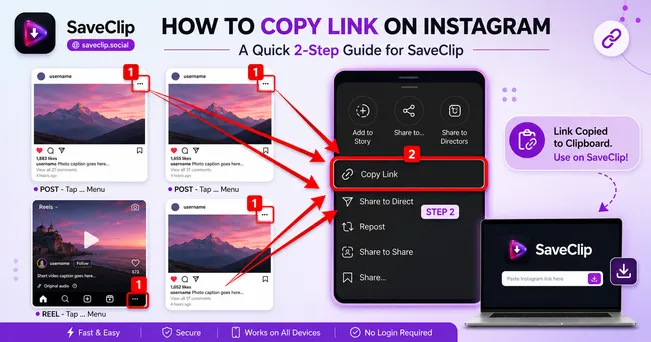
Step 1: Copy Instagram Photo or Carousel Link
Open the Instagram app or website. Navigate to the photo or carousel post, tap the Share icon (paper airplane), and tap Copy Link.

Step 2: Launch SaveClip Downloader
Open SaveClip Instagram Downloader in your browser, paste the URL link into the input bar, and tap Fetch Media.
Step 3: Preview & Download Individual HD Images
SaveClip will display each slide in full high definition. Click the Download HD Photo button under any specific photo or download all images directly to your gallery.
Original 1080p High-Resolution Guarantee: SaveClip preserves original 1080x1080 square, 1080x566 landscape, and 1080x1350 vertical image dimensions without extra compression.
Comparing Photo Download Methods
| Method | Image Resolution | Carousel Support | Clean (No UI Overlay) | Ease of Use |
|---|---|---|---|---|
| SaveClip Downloader | 1080p Original HD | ⭐ ⭐ ⭐ ⭐ ⭐ (Splits all slides) | ✅ 100% Clean JPG/PNG | Instant Web Tool |
| Smartphone Screenshots | Screen Native (Low) | ❌ Manual per slide | ❌ Has UI, icons & notch | Requires cropping |
| Browser Page Inspection | 1080p Source | ⭐ ⭐ (Requires DOM search) | ✅ Clean File | Complex code inspection |
Device-Specific Walkthrough: iOS, Android, and Desktop
Downloading Photos on iPhone & iPad
Open Safari on your iOS device, visit SaveClip, paste the photo URL, and tap Fetch Media. Under your chosen carousel slide, tap Download. Safari will open the image file. Long press the image and select "Add to Photos" or use Safari's download menu to store it in your iOS camera roll.
Downloading Photos on Android Devices
On Android Chrome, paste the copied link into SaveClip. Tap Download on your preferred slide. The image file will instantly download to your device's `Pictures` or `Downloads` folder, automatically accessible inside Google Photos.
Downloading Photos on PC & Mac
On desktop computers, simply right-click any extracted image on SaveClip and select "Save Image As..." to store original JPG files directly in designated folders.
Technical Insights: Color Profiles (sRGB / Display P3) & EXIF Data
When professional photographers publish visual portfolios on Instagram, maintaining exact color accuracy across devices is paramount. Instagram supports both standard sRGB and wide-gamut Display P3 color spaces on iOS and modern Android displays.
Screen capture utilities and mobile screenshot functions strip ICC color profile tags, causing vibrant blues, subtle skin tones, and shadow contrast to appear washed out or over-saturated when viewed on external monitors. By downloading direct source JPG/PNG files via SaveClip, color profile headers remain intact.
Handling Mixed-Media Carousels (Photos + Videos)
Modern Instagram posts frequently blend high-definition still photos with 1080p short video clips inside a single 10-slide album carousel. Traditional photo downloaders often fail or return errors when encountering video slides inside photo albums.
SaveClip features an intelligent media parser that identifies each slide type dynamically:
- - Image Slides: Extracted as full-resolution uncompressed 1080p JPG graphics.
- - Video Slides: Extracted as crisp 1080p MP4 video files with full stereo audio tracks.
- - Individual Item Selection: Choose to download single specific slides or grab all album items sequentially.
Best Practices for Archiving Photography Collections
If you are a graphic designer creating mood boards, a fashion stylist cataloging outfit inspirations, or a researcher archiving digital artwork:
💡 Archiving Tip: Organize saved carousel downloads into folder structures named by creator handle and date (e.g., `CreatorName_2025_08_Carousel`). This maintains source context for future referencing.
Understanding Image Compression: JPEG vs WEBP vs PNG Formats
When creators upload high-resolution images to Instagram, Meta converts the original uploads into multiple scaled image assets formatted in optimized JPEG or WEBP file types. WEBP provides superior image compression with smaller file sizes while preserving sharp color boundaries.
SaveClip inspects the post JSON response payload to extract the absolute largest dimension variant available on Instagram servers (up to 1080x1350 vertical pixels or 1080x1080 square canvas). This ensures that whether you are viewing saved photos on a 4K desktop monitor or retina smartphone screen, image pixelation and compression artifacts remain minimal.
Ethics, Copyright, and Fair Use Guidelines
Downloading photography from Instagram carries moral and legal responsibilities. Always remember:
- - Personal Inspiration & Archiving: Saving moodboard images, design inspiration, or workout charts for private reference is accepted personal fair use.
- - Commercial & Public Re-use: Never use a creator's photography for commercial advertising, print sales, or public social media accounts without written consent and proper attribution.
Frequently Asked Questions (FAQ)
Can I download all photos from an Instagram carousel post at once?
Yes. SaveClip breaks down multi-slide carousels into individual high-definition images so you can save whichever slides you need directly to your device.
What is the maximum photo resolution saved by SaveClip?
SaveClip downloads the exact resolution stored on Instagram servers, up to 1080x1350 pixels for portrait photos and 1080x1080 for square posts.
Does SaveClip support downloading mixed media carousels (Photos + Videos)?
Yes! If an Instagram carousel contains both photos and video slides, SaveClip displays image slides as HD JPGs and video slides as HD MP4s, letting you save whichever media formats you require for your device storage.
Is it free to download Instagram photos using SaveClip?
SaveClip is 100% free with unlimited image downloads and no account registration.
Why do photos downloaded from Instagram look sharper than phone screenshots?
SaveClip downloads the raw 1080p source image directly from Instagram servers, whereas phone screenshots downscale image quality to match your phone display pixel canvas.
Can I download private Instagram carousel photos with SaveClip?
No. SaveClip respects Meta privacy policies and strictly processes public Instagram photos and carousels only.
How fast is the Instagram photo extraction process on SaveClip?
SaveClip processes links in under 2 seconds. Once you click Fetch Media, all image slides are ready for high-speed download instantly without delays, queue wait times, or server throttling on any browser.