Wondering how to download a video from Instagram safely and easily? The most effective method is using a free, web-based tool. Simply copy the public link from the Instagram app or website, paste it into a web downloader like SaveClip, and save the original Full HD MP4 file directly to your smartphone or computer. It is a quick, secure process that requires zero app installs or account passwords.
Why You Might Want to Download Instagram Videos
While sharing memes with friends is popular, the reasons for downloading Instagram media run much deeper. For creators, marketers, educators, and everyday users, offline media preservation is essential:
Small business owners often receive customer testimonial Reels or user-generated product reviews on Instagram. Because Instagram Stories disappear after 24 hours and post availability depends on account holders, saving those videos locally creates a permanent digital portfolio.
Digital marketers also analyze top-performing Reels offline to study video transitions, trending audio cues, text overlays, and hook pacing. Having local video access allows video editors to dissect strategies without relying on continuous internet connectivity.
Key Takeaway: Downloading isn't just about saving clips. It is a practical strategy for preserving personal memories, performing competitor research, creating offline archives, and studying viral video edits.
Legitimate Reasons to Download Instagram Videos
Here is a breakdown of practical and common use cases for saving media from Instagram:
| Use Case | Description | Primary Benefit |
|---|---|---|
| Archiving Personal Content | Saving your own uploaded Reels, Stories, or posts as local backups. | Prevents data loss if accounts are disabled. |
| Offline Viewing | Downloading workout tutorials, recipes, or educational lectures. | Watch anywhere without mobile data or Wi-Fi. |
| Market & Creative Research | Analyzing viral video hooks, transitions, and audio trends offline. | Sharpens video production skills. |
| Preserving Family Memories | Saving milestone clips shared by family or friends. | Permanent local gallery backup. |
| UGC Content Curation | Gathering customer video reviews with creator permission. | Builds authentic brand trust on websites. |
Common Real-World Scenarios
- - Preserving Special Memories: When family members share irreplaceable event clips on Instagram, downloading them ensures they remain safe even if posts are deleted later.
- - Content Creator Backups: Creators spend hours filming and editing Reels. Keeping raw copies in local storage is vital, as outlined in our mission on SaveClip.
- - Learning & Skill Building: Chefs save cooking tutorials to follow in kitchens where signal is weak; fitness enthusiasts save exercise routines for phone offline use at the gym.
With over 2 billion active monthly users and Reels receiving over 140 billion plays daily, the volume of valuable video content is staggering. A reliable download workflow is indispensable.

Using a Web-Based Downloader: Step-by-Step Tutorial
Using a clean web utility like SaveClip is the safest method. There are no executable files to download and no software setup required.
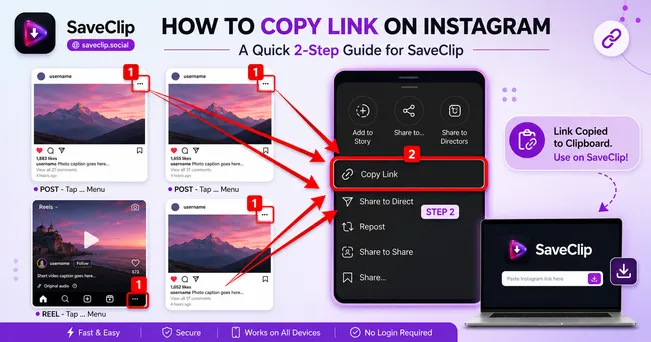
Step 1: Copy Video URL
Open the Instagram app on your mobile device or navigate to Instagram in a web browser. Go to the video or Reel, tap the Share icon (paper airplane), and select Copy Link.

Step 2: Paste Link on SaveClip
Open SaveClip Instagram Downloader, paste the link into the search bar, and click Fetch Media.
Step 3: Save Full HD MP4 File
Select your preferred quality format (1080p Full HD MP4 or MP3 Audio) and click Download. Your file saves directly to your device.
⚠️ Security Warning: Never enter your Instagram account password or login credentials on third-party download sites. Reputable web tools like SaveClip only require the public video URL link and operate 100% anonymously.
Device-Specific Guides: iOS, Android, and Desktop
Downloading on iPhone & iPad
On iOS, use Safari to open SaveClip. Paste the video link and click Download. Safari's native download manager will handle the MP4 file. Once downloaded, tap the download icon in Safari's search bar, open the video, tap Share, and select Save Video to move it into your Photos camera roll.
Downloading on Android Smartphones
On Android, open Chrome, navigate to SaveClip, paste the link, and hit Download. The file will save directly into your device's `Downloads` folder and display instantly in Google Photos.
Downloading on Desktop (Windows, Mac, Linux)
Right-click the video link on Instagram on web, select Copy, paste into SaveClip, and save the file straight to your desktop folder in original bitrate.
Staying on the Right Side of Privacy and Copyright
Crucial Rule: You should never attempt to bypass privacy settings to download videos from private Instagram accounts. SaveClip strictly adheres to Meta privacy policies and processes public media only.
Personal Viewing vs. Public Reposting
Saving public videos to your device for personal reference, learning, or offline enjoyment is standard fair use.
Re-uploading another user's video without explicit creator credit and permission can violate copyright guidelines.
Comparing Instagram Download Methods
| Method | Pros | Cons | Best Used For |
|---|---|---|---|
| Web Tool (SaveClip) | No installation; works on all devices; 100% free; safe. | Requires copying URL link. | Quick HD downloads on mobile & desktop. |
| Mobile Apps | App convenience. | App store policy risks; malware; forces ads/logins. | Not recommended for privacy. |
| Browser Extension | One-click button on desktop browser. | Slows browser performance; desktop only. | Heavy desktop users. |
Understanding Video Codecs and Resolution Preservation
When videos are uploaded to Instagram, Meta's media processing pipeline transcodes raw camera files into efficient H.264 or AV1 MP4 video streams formatted for dynamic bitrate streaming. Using screen recording software re-compresses the displayed video, resulting in color quantization artifacts, blurred motion, and reduced audio sample rates.
By contrast, direct web extraction via SaveClip fetches original high-bitrate MP4 container files straight from Meta's edge servers. This guarantees that 1080p vertical video streams (1080x1920 pixels) retain maximum sharpness, original 30fps or 60fps frame rates, and crisp 256kbps AAC audio tracks.
Troubleshooting Instagram Video Downloads
- - Private Account Links: If a link returns an error, confirm whether the post belongs to a private profile. Private videos cannot be fetched due to platform security restrictions.
- - Expired Video Tokens: Instagram CDN signatures expire after a short window for security. If a download link stalls, re-copy a fresh post link from Instagram and re-submit it on SaveClip.
- - Audio Mute Issues: Certain Instagram Reels feature audio tracks muted by copyright holders in select countries. SaveClip extracts the video audio stream exactly as published by Instagram.
- - Browser Cache & Extension Blockers: If the download button does not trigger, disable aggressive ad-blockers or try clearing your browser cache.
Frequently Asked Questions (FAQ)
Is it legal to download Instagram videos for personal use?
Downloading public Instagram videos for personal, offline viewing is widely considered personal fair use, provided you do not re-distribute or monetize the content without permission.
Does the creator know if I download their Instagram Reel?
No. SaveClip fetches media anonymously via public web links. Instagram does not notify creators or track downloads.
Can I download Instagram videos in 1080p Full HD?
Yes. SaveClip extracts original uncompressed 1080p MP4 video files directly from Instagram servers without extra compression.
How to convert Instagram Reel video to MP3 audio?
Paste the Reel URL into SaveClip, press Fetch Media, and choose the '🎵 Audio Only (MP3)' option to download high quality MP3 audio.
Do I need to pay or create an account on SaveClip?
No. SaveClip is 100% free with unlimited conversions and zero registration requirements.
Can I download Instagram Stories before they disappear in 24 hours?
Yes, as long as the Instagram account is public, you can copy the Story link and paste it into SaveClip to permanently preserve the Story video on your device.
Why is my downloaded Instagram video playing without sound on iPhone?
On iOS, ensure your iPhone hardware silent switch is turned off, or check if the original Instagram Reel contained audio before downloading.