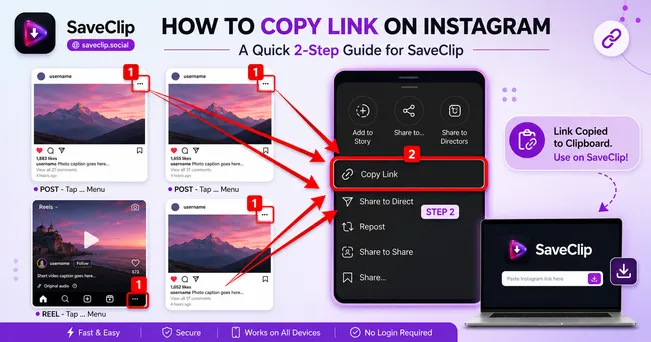
SaveClip is a high-speed online TikTok video downloader that allows you to download TikTok videos without logo watermarks or bouncing user ID overlays. SaveClip supports downloading TikTok videos across all mobile, tablet, and desktop devices without installing third-party apps, software, or browser extensions. In this comprehensive guide, explore how SaveClip removes watermarks, extracts MP3 audio, and delivers pristine 1080p MP4 videos.
The Problem with In-App TikTok Downloads
When you tap "Save Video" inside the native TikTok application, TikTok embeds a bouncing watermark logo and creator `@username` tag across alternate corners of the screen. Furthermore, native downloads append an end-screen branding bumper, increasing file size while degrading video resolution down to 720p or 480p.
For content creators who want to repurpose their own videos across Instagram Reels, YouTube Shorts, Pinterest Idea Pins, or LinkedIn video posts, these bouncing watermarks look unprofessional. In fact, recommendation algorithms on Instagram and YouTube actively penalize videos containing competitor watermarks. Using SaveClip ensures clean, un-watermarked HD video files ready for professional cross-platform distribution.

Why SaveClip is the Ultimate TikTok Downloader
- - 100% Watermark Free: SaveClip bypasses the client-side watermark rendering layer, delivering raw MP4 video streams directly from TikTok CDN servers.
- - Uncompressed 1080p HD Resolution: Experience original high bitrate video without pixelation or compression artifacts.
- - Standalone MP3 Sound Extraction: Convert viral TikTok sounds, background music, or speech voiceovers directly into standalone MP3 audio files.
- - Universal Cross-Platform Compatibility: Native mobile browser support across iOS Safari, Android Chrome, Windows, macOS, and Linux.
Step-by-Step Guide: How to Download TikTok Videos Without Watermark
Step 1: Copy TikTok Video URL
Open the TikTok app on your smartphone or access TikTok in your desktop browser. Find the video you wish to save, select Share, and tap Copy Link.

Step 2: Visit SaveClip TikTok Downloader
Open SaveClip TikTok Downloader in your browser.
Step 3: Paste Link & Fetch Media
Paste your copied URL link into the search bar and press Fetch Media.
Step 4: Download MP4 or MP3
Click Download MP4 (No Watermark) or Download MP3 Audio to save the file directly to your camera roll or downloads folder.
No Registration Required: SaveClip does not ask for personal details, account logins, or credit cards. It is 100% free and unlimited.
Method Comparison: SaveClip vs In-App Save vs App Store Downloaders
| Comparison Criteria | SaveClip Web Tool | Native TikTok Save | Third-Party Mobile Apps |
|---|---|---|---|
| Watermark Overlay | ✅ 100% Clean (No Watermark) | ❌ Bouncing logo & handle | Variable / Fake watermarks |
| Video Quality | Original 1080p Full HD | Compressed 720p / 480p | Compressed 480p |
| Security & Privacy | 🔒 100% Safe (No Login) | Account bound | 🚨 Requires login / Ad spam |
| MP3 Extraction | ✅ Supported | ❌ Not supported | Rarely supported |
Device Walkthroughs: iPhone, Android, PC & Mac
Downloading TikTok Videos on iPhone & iPad
Copy the video link from TikTok app. Open Safari on iOS, visit SaveClip, paste the URL, and tap Fetch Media. Click Download MP4 (No Watermark). Safari will handle the download. Open the Safari downloads manager, tap the saved video file, tap Share, and select Save Video to move it straight into your iOS Photos camera roll.
Downloading TikTok Videos on Android Devices
On Android Chrome, paste the copied link into SaveClip and tap Download. The file will save directly into your internal storage `Downloads` directory, making it instantly playable in Google Photos or CapCut.
Downloading TikTok Videos on Desktop PC & Mac
On desktop computers, paste the TikTok URL into SaveClip and save clean HD MP4 files straight into your video editing project folder.
Technical Deep Dive: How TikTok Embeds Client-Side Watermarks
Understanding how TikTok watermarking works reveals why web extractors like SaveClip are so effective. When a creator uploads a video to TikTok, ByteDance servers store two distinct assets:
- 1. Clean Source Master Stream: The raw, high-bitrate 1080p MP4 file uploaded by the user, stored directly on ByteDance CDN servers without any visual overlays.
- 2. Dynamic Watermarked Render: When you press "Save Video" inside the mobile app, TikTok triggers a client-side rendering job that burns the bouncing `@username` logo and end-card graphic directly onto the video frames.
SaveClip bypasses the secondary rendering job entirely. By parsing public video metadata, SaveClip locates the direct URL to the clean source master stream, serving you original 1080p video without logo overlays.
Video Stream Bitrates & Bandwidth Efficiency
TikTok serves video content using dynamic adaptive bitrate streaming. Depending on your current network connection speed (4G, 5G, or Wi-Fi), the TikTok app may lower video playback quality to prevent buffering interruptions.
SaveClip operates independently of your client-side playback connection speed. It requests the original master video encoding from ByteDance CDN servers, fetching the absolute highest bitrate 1080p MP4 file regardless of whether your mobile connection is temporarily slow.
Cross-Posting Workflows: Why Algorithm Safety Matters
Major social platforms (Meta's Instagram Reels, Google's YouTube Shorts, and Pinterest Idea Pins) employ computer vision scanning systems that detect competitor branding watermarks.
⚠️ Algorithm Warning: Uploading a TikTok video with visible bouncing TikTok logos onto Instagram Reels or YouTube Shorts drops your organic reach by up to 75%. Social algorithms suppress posts containing rival platform logos.
Using SaveClip to obtain a clean MP4 file ensures your re-purposed content gets maximum exposure and organic distribution on Instagram and YouTube Shorts algorithms.
Ethics, Copyright, and Fair Use Policy
While SaveClip makes watermark removal seamless, users must adhere to copyright standards. Downloading your own TikTok content for multi-platform repurposing is best practice. If you are saving third-party content, ensure it is for personal offline viewing or research, and always credit original creators when re-sharing.
Frequently Asked Questions (FAQ)
Why use SaveClip to download TikTok videos?
SaveClip is a fast online TikTok downloader that helps you save TikTok videos without watermarks quickly on iPhone, Android, or PC without installing software. It preserves original 1080p resolution and uncompressed sound quality across all devices.
Is SaveClip TikTok Downloader free to use?
Yes. SaveClip is 100% free with unlimited conversions and no account creation needed.
Can I convert TikTok videos to MP3 audio?
Yes. Simply paste the TikTok video link into SaveClip and select the '🎵 Audio Only (MP3)' option to download high-quality audio tracks directly to your device for offline playback or audio editing.
Why can't I download a specific TikTok video?
If a link fails, verify that the TikTok video post is public and not from a private account. Private videos cannot be fetched via public web tools.
Does SaveClip store downloaded videos on its servers?
No. SaveClip processes link requests dynamically and does not store or cache user downloaded media on its servers.
Can I download TikTok photo slideshow posts (Photo Mode) with SaveClip?
Yes! When you paste a link to a TikTok photo slideshow post, SaveClip extracts every high-resolution slide image individually without watermarks.
Do I need to install a browser extension to download TikTok videos without watermark?
No. SaveClip is a web-based utility that works directly inside any web browser on iOS, Android, macOS, and Windows without plugins.
Does SaveClip preserve high frame rate 60fps TikTok videos?
Yes. If the original TikTok video was uploaded at 60fps, SaveClip fetches the direct MP4 stream at full 60 frames per second without dropping frames, maintaining silky smooth playback on mobile and desktop displays.